Sybase to PostgreSQL Replication
Use this workflow to replicate data from Sybase to PostgreSQL in NineData. Sybase to PostgreSQL replication supports full replication and incremental replication.
Overview
NineData data replication supports schema, full data, and incremental data replication between data sources. For supported data sources, it also supports bidirectional replication for geo-distributed active-active architectures.
- Schema replication: Replicates object structures between homogeneous and heterogeneous data sources.
- Full data replication: Uses data sharding and row-level concurrent batch replication to improve throughput. Breakpoint resume helps preserve data accuracy, including for tables without primary keys.
- Incremental data replication: Replicates DML and DDL changes for supported object types. Row-level concurrency and hotspot merge processing help maintain replication throughput.
- Bidirectional real-time data replication (only between MySQL instances): Replicates changes in both directions between nodes so data can stay current across participating nodes.
Use these capabilities for full or incremental data replication, migration, synchronization, data integration, and low-downtime migration workflows.
Before you begin
Add both the source and target data sources to NineData. For details, see Creating Data Sources.
Create the target table manually in PostgreSQL before you start replication. The target table structure must match the Sybase table that you want to replicate. Because Sybase to PostgreSQL replication does not support schema replication, adjust PostgreSQL column types and constraints based on your business requirements. For common data type mappings and DDL suggestions, see Data type mapping and target table suggestions.
To perform bidirectional replication, you must add a multi-active tag to all data sources involved in the replication task. For instructions on how to add this tag, see the Appendix.
The versions of the source and target data sources are listed in the table below.
Source Data Source Target Data Source Sybase 16.0, 15.7 PostgreSQL 16, 15, 14 You must have the following permissions for the source and target data sources.
Replication Type Sybase PostgreSQL One-way Full and Incremental Replication replication_role, sso_role All Privileges on Schema, All Privileges on All Tables Two-way Full and Incremental Replication sa_role Database Owner, Table Owner, All Privileges on Schema, Replication Role For a detailed comparison of Sybase -> PostgreSQL, PostgreSQL -> Sybase, and the bidirectional replication scenario, including trigger behavior and grant examples, see PostgreSQL and Sybase Replication Permission Guide.
Limitations
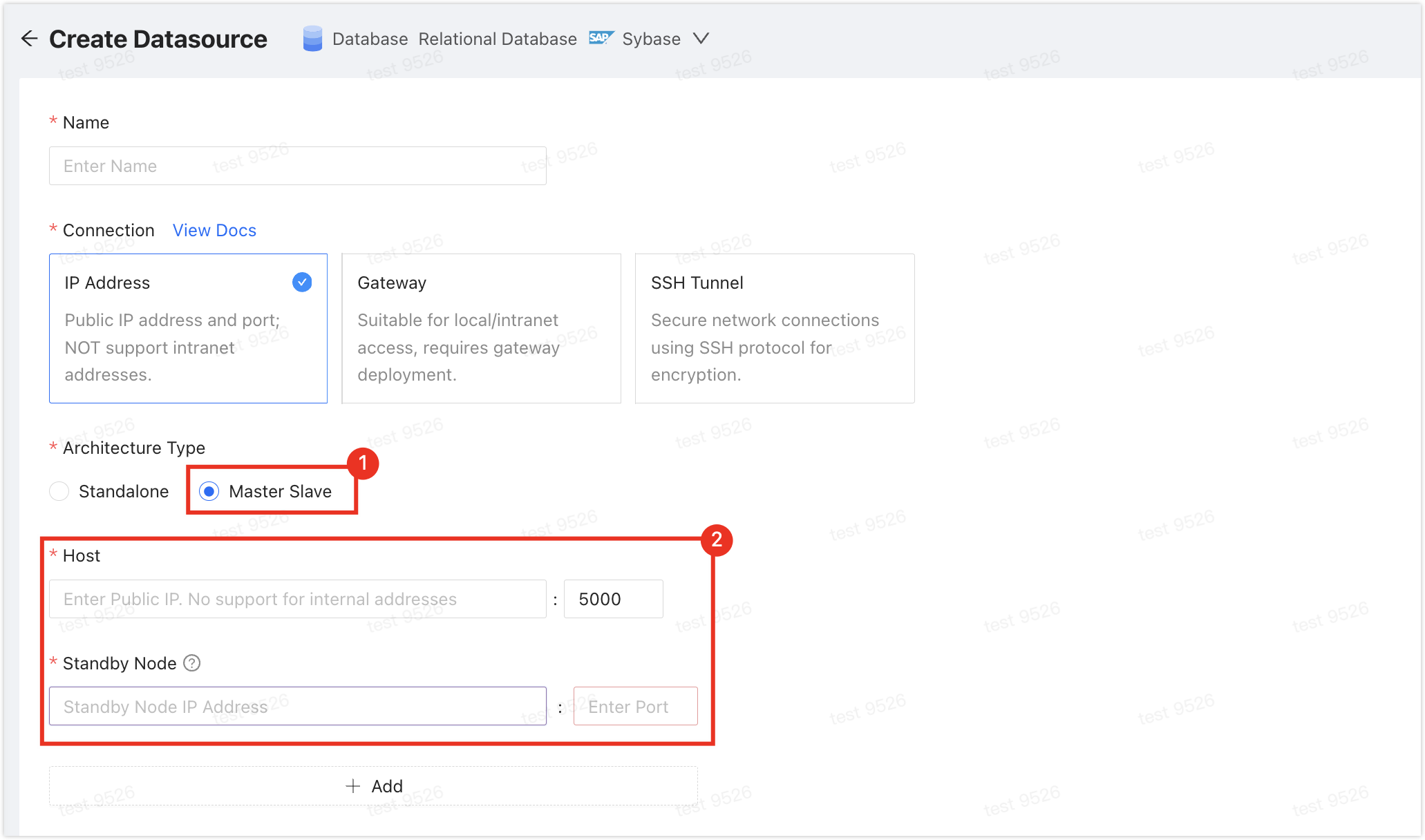
If your Sybase data source is deployed in a primary-secondary architecture and bidirectional replication is required, enter the connection addresses of both the primary and secondary nodes when adding the data source. Otherwise, data backflow from PostgreSQL to Sybase will fail.
Check the performance of both data sources before you start. Run replication during off-peak hours so full initialization does not overload the source or target.
Make sure each synchronized table has a primary key or unique constraint, and keep column names unique to avoid duplicate rows.
Field mapping and field expressions
- The target field must be an existing column in the PostgreSQL target table.
- In
Configuration Mapping > Mapping and Filtering > Field Expression, configure field expressions for existing target columns.
For the entry, usage rules, and common writing patterns of field expressions, see ETL Functions.
Procedure
Sign in to the NineData Console.
In the left navigation pane, click Replication > Data Replication.
On the Replication page, click Create Replication.
On the Source & Target tab, configure the fields in the table, and click Next.
Parameter Description Name Enter a name for the data synchronization task. To make the task easier to find and manage later, use a meaningful name. Up to 64 characters are supported. Source The data source that contains the objects to synchronize. Target The data source that receives the synchronized objects. Target Object Name Select the case conversion rule for object names after they are migrated from the source to the target. - Convert all to Lowercase: Regardless of the naming rule on the source, all target names are lowercase.
- Consistent with Source: Keep the naming rule of the source.
- Convert all to Uppercase: Regardless of the naming rule on the source, all target names are uppercase.
Replication Mode Select the replication mode. - Uni-directional: A unidirectional data replication task from the source data source to the target data source.
- Bi-directional: A bidirectional incremental data replication task between the source and target data sources.
Type Required when Replication Mode is Bi-directional.Select the replication type. - Full: Synchronize all objects and data from the source data source, namely full data replication. The switch on the right enables periodic full replication. For more information, see Periodic Full Replication.
- Incremental: After full synchronization completes, perform incremental synchronization based on the logs of the source data source.
Forward Type Required when Replication Mode is Bi-directional. Select the forward replication type. - Full: Synchronize all objects and data from the source data source, namely full data replication.
- Incremental: After full synchronization completes, perform incremental synchronization based on the logs of the source data source.
Incremental Started Required only when Type is Incremental. - From Started: Use the current replication task start time as the baseline for incremental replication.
- Customized Time: Select the point in time from which incremental replication starts. Select a time zone based on the region of your business. If the configured time point is earlier than the current replication task start time and DDL operations occurred during that period, the replication task will fail.
Forward Incremental Started Required only when Forward Type is Incremental. - From Started: Use the current replication task start time as the baseline for incremental replication.
- Customized Time: Select the point in time from which incremental replication starts. Select a time zone based on the region of your business. If the configured time point is earlier than the current replication task start time and DDL operations occurred during that period, the replication task will fail.
Reverse Type The replication type from the target data source to the source data source. This parameter is displayed only when Replication Mode is Bi-directional. Only Incremental is supported, and it is selected by default and cannot be disabled. Spec The specification of the replication task. A larger specification provides a higher replication rate. Hover over the  icon to view the rate and configuration information of each specification. If you configure the data replication task before purchasing resources, you can select the required specification here. If you purchase resources before configuring the task, NineData selects the specification specified during purchase, and you cannot change it in the task configuration.
Target Table Exists Data (Required when Full is selected) - Pre-Check Error and Stop Task: Stop the task when data is detected in the target table during the precheck stage.
- Ignore existing target data and append to it.: When data is detected in the target table during the precheck stage, ignore that data and append other data.
- Clear target existing data before write: When data is detected in the target table during the precheck stage, delete that data and write it again.
Incremental data conflict handling strategy for target table (Required when Incremental is selected) - Runtime error: During incremental replication, report an error when target data already exists and wait for manual intervention.
- Do not update target data: During incremental replication, do not write data when target data already exists, and continue subsequent tasks.
- Update target data: During incremental replication, overwrite the target data when target data already exists.
On the Objects tab, configure the parameters in the table, and click Next.
Parameter Description Replication Objects Select the content to replicate. Select All Objects to replicate all content in the source database, or select Customized Object, select the content to replicate in the Source Object list, and click > to add it to the Target Object list on the right. To create multiple replication tasks with the same replication objects, import a configuration file. Click Import Config, click Download Template to download the template, edit the file, and then click Upload to upload it and import the objects in bulk. For field descriptions and examples, see Import Replication Object Templates. The configuration file uses these fields:
Parameter Description Example source_table_nameThe exact source table name of the object to synchronize. example_tbl_nametarget_table_nameThe target table name that receives the synchronized object. example_tbl_namesource_database_nameThe source database name of the object to synchronize. test_dbtarget_database_nameThe target database name that receives the synchronized object. test_db_bakcolumn_listThe list of columns to synchronize. ["col1", "clo2", "col3"]extra_configurationA JSON string containing additional configuration. Use column_rulesfor column mappings and value rules:column_nameis the source column,target_column_nameis the target column,target_column_typeis the target column type, andcolumn_valueis the column value. Usefilter_conditionfor row-level filtering.{"extra_config": {"column_rules": [...]}}tipThe following JSON represents the two example rows in the downloaded Excel template. When uploading the file, keep the Excel column names and enter the
extra_configurationvalue as a JSON string. This code block is not a JSON file that you can upload directly.[
{
"source_table_name": "example_tbl_name",
"target_table_name": "example_tbl_name",
"source_database_name": "test_db",
"target_database_name": "test_db_bak",
"column_list": ["col1", "clo2", "col3"],
"extra_configuration": {
"extra_config": {
"column_rules": [
{
"column_name": "example_column_name",
"target_column_name": "example_target_column_name",
"target_column_type": "int",
"column_value": "current_timestamp()"
},
{
"column_name": "example_column_name",
"target_column_name": "example_target_column_name",
"target_column_type": "int"
}
],
"filter_condition": "example_condition_expression"
}
}
},
{
"source_table_name": "example_order_tbl",
"target_table_name": "example_order_tbl",
"source_database_name": "test_db",
"target_database_name": "test_db_bak",
"column_list": ["col1", "clo2", "col3"],
"extra_configuration": {
"extra_config": {
"column_rules": [
{
"column_name": "example_column_name",
"target_column_name": "example_target_column_name",
"target_column_type": "int",
"column_value": "current_timestamp()"
},
{
"column_name": "example_column_name",
"target_column_name": "example_target_column_name",
"target_column_type": "int"
}
],
"filter_condition": "example_condition_expression"
}
}
}
]On the Mapping tab, configure the mapping that matches the selected replication type, then click Save and Pre-Check. If source or target metadata changes while you configure mappings, click Refresh Metadata to refresh the metadata.
Includes Schema: Configure the table name after synchronization to the target data source.
Does not include Schema: NineData selects the database with the same name in the target data source by default. If no such database exists, select the target database manually. The table names and column names in the target database must match the synchronization objects. If they do not match, map the table names and column names manually.
Other available actions:
- Click Mapping & Filtering to customize the column names after synchronization to the target data source.
- On the Mapping & Filtering page, enter a comparison expression in the text box below Data Filter as the filtering condition. Only data that meets the filtering conditions is synchronized to the target data source. For example, if the filtering condition is set to
emp_no>=10005, data whose emp_no column value is less than 10005 is not synchronized to the target data source. - Click the
 icon to the right of "Target Table" to search for a table name and replace it with the target name.
 - Enter a table name in the Search Table text box to quickly locate the target table.
- Click Batch Configuration to define common rules in batches, such as table name and column name case conversion, prefix or suffix addition, and replacement. Use this option to apply mapping configuration to many tables and columns at the same time.
On the Pre-check tab, wait for the precheck to finish. After it passes, open the saved task's details from the replication task list and start the task.
Select Enable data consistency comparison to start a data consistency comparison task based on the source data source after synchronization completes. Based on the selected Type, Enable data consistency comparison starts at these times:
- Full: Starts after full replication completes.
- Full+Incremental, Incremental: Starts when incremental data is consistent with the source data source for the first time and Delay is 0 seconds. Click View Details to view synchronization delay on the Details page.

If the precheck fails, click Details in the Actions column for the failed check item, review the cause, fix the issue, and then click Check Again to run the precheck again until it passes.
Items with Warning in Result can be fixed or ignored if required.
After the replication task starts, you can perform the following actions:
- Click View Details to view the execution status of each stage of the synchronization task.
- Click Back to list to return to the Replication task list page.
Modify incremental synchronization positions
For a task whose replication type includes Incremental and whose task details provide position management, you can view and modify synchronization positions. The available position types and input format depend on the data source and replication link. Follow the options displayed for the current task. If a position is shown as - or no position type is available for selection, the current task has no position available for modification.
This feature is intended for specific operations and maintenance scenarios where you need to specify a new log-read position or synchronization-write position for an incremental task. The read position controls where the task continues reading from the source, while the write position controls where it continues processing synchronized writes. After you submit the change, the task pauses and restarts so that the new position can take effect.
In the replication task list, click the Task ID of the target task to open its details.
On the Incremental tab, click Synchronous site management to view the current read site and write site.
Click modify site. Under site type, select the read site or write site to adjust, and then enter the value for Adjustment point according to the position type displayed for the task.
Confirm the value and scope of impact, and click Verify and submit. The task enters a pause and relaunch process. After the task resumes running, open Synchronous site management again to confirm that the position has been updated.
Modifying the synchronization point will adjust the point of log reading or synchronization writing, which may cause data loss, so operate with caution! Modifying either position may cause data loss or inconsistency between the source and target. Perform this operation only in an authorized test environment or during a maintenance window with a backup and rollback plan. A task whose incremental replication has finished cannot have its position reset.
Results
Sign in to the NineData Console.
In the navigation menu, select Replication > Data Replication.
On the Replication page, click the Task ID of the target synchronization task. The task details page displays the following information.

No. Function Description 1 Sync Delay The synchronization delay between the source and target data sources. 0seconds means the target has caught up with the source. Switch traffic based on your migration plan.2 Configure Alarm When the task fails, NineData notifies the selected channel through the configured alert. 3 More - Pause: Pause writes to the target while the source-side reader keeps running. Only tasks with the status Running can be selected.
- Pause Incremental Reader: Suspend the source-side reader. Use this only when the task is affecting source-side business workloads. If source logs are cleaned up during the suspension period, complete incremental changes may not be written to the target. Only tasks with the status Running can be selected.
- Duplicate: Create a new replication task with the same configuration as the current task.
- Terminate: End an incomplete or listening task (that is, a task still in incremental synchronization). After termination, the task cannot be restarted. Proceed with caution. If the replication objects include triggers or events, the dialog displays termination options for the applicable object type:
- Migrate triggers and terminate or Migrate events and terminate: Migrate the applicable objects to the target data source before terminating the task.
- Do not migrate triggers; terminate immediately or Do not migrate events; terminate immediately: Terminate the task immediately without migrating the applicable objects.
- Delete: Delete the task. Once deleted, the task cannot be recovered. Proceed with caution.
4 Full Copy (Displayed in the full copy scenario) Shows the progress and details of the full copy. - Select Monitor to view monitoring metrics during the full copy process. During full copy, select Flow Control Settings on the monitoring page to limit the number of rows written to the target data source per second.
- Select Log to view the execution log of the full copy.
- Select the
 to view the latest information.
5 Incremental Copy (Displayed in the incremental copy scenario) Shows various monitoring indicators of the incremental copy. - Select View Threads to view the operations being executed by the current replication task, including:
- Thread ID: The replication task is executed in multiple threads, showing the current ongoing thread number.
- Execute SQL: Details of the SQL statement currently being executed by the thread.
- Response Time: Response time of the current thread. If this value increases, it means the current thread may be stuck for some reason.
- Event Time: Timestamp when the current thread was started.
- Status: Status of the current thread.
- Select Flow Control Settings to limit the number of rows written to the target data source per second.
- Select Log to view the execution log of the incremental copy.
- Select the to view the latest information.
6 Modify Objects Shows the modification records of the synchronization objects. - Select Modify Objects to configure the synchronization objects.
- Select the to view the latest information.
7 Data Comparison Shows the comparison results between the source and target data sources. If data comparison is not enabled, select Enable Comparison on the page to enable it. - Select Re-compare to rerun the comparison for the current source and target data sources.
- Select Stop to stop the comparison task immediately after it starts.
- Select Log to view the execution log of the consistency comparison.
- Select Monitor (only displayed in data comparison) to view the RPS (records per second) trend chart of the comparison. Select Details to view earlier records.
- In the Actions column in the comparison list, select
 (displayed only when inconsistencies are found on the Data tab) to view the comparison details between the source and target data sources.
 - In the Actions column in the comparison list, select
 (displayed when inconsistencies are found) to generate change SQL. Copy this SQL to the target data source and run it to fix the mismatch.
8 View Reverse In bidirectional replication tasks, click to view the replication details from the target data source to the source data source. 9 More Shows detailed information of the current replication task.
Appendix: Add a multi-active tag to all data sources involved in replication
To prevent loop replication, add a multi-active tag to all data sources involved in the replication task.
Sign in to the NineData Console.
- From the navigation menu, click Datasource > Datasource.
- Click the target data source ID to open the Details page.
- In the data source details area (which includes information such as data source name, ID, creator, creation time, etc.), click More.
- Find Multi-Active Tag and click the
 icon next to it.
 - Enter the multi-active tag and click OK.
- The multi-active tag can contain 1-64 characters.
- The multi-active tag must be globally unique and cannot duplicate other multi-active tags.
Appendix: Data type mapping and target table suggestions
Replication from Sybase to PostgreSQL does not support schema replication. Use this section as a reference for manual table creation. When creating target tables, adjust PostgreSQL column types and constraints based on field semantics, precision requirements, application compatibility, and query patterns.
Data type mapping
| Category | Sybase Data Type | Recommended PostgreSQL Type | Optional Types and Notes |
|---|---|---|---|
| Character | CHAR(n) | CHAR(n) / CHARACTER(n) | Use this when fixed-length semantics must be preserved. |
| Character | VARCHAR(n) | VARCHAR(n) / CHARACTER VARYING(n) | The length definition can usually be kept as-is. |
| Character | TEXT | TEXT | Suitable for long text fields. |
| Character | UNITEXT | TEXT | Use VARCHAR(n) if length limits are still required. |
| Character | UNICHAR(n) | CHAR(n) | Use VARCHAR(n) if variable-length storage is preferred. |
| Character | UNIVARCHAR(n) | VARCHAR(n) | Commonly used for variable-length Unicode strings. |
| Character | NCHAR(n) | NCHAR(n) / CHAR(n) | In PostgreSQL, standardize on CHAR(n) if needed. |
| Character | NVARCHAR(n) | VARCHAR(n) | Use TEXT if no length limit is required. |
| Numeric | BIGINT | BIGINT | Suitable for signed 64-bit integers. |
| Numeric | UNSIGNED BIGINT | NUMERIC | PostgreSQL does not support unsigned integers; use NUMERIC or DECIMAL(p,0) to preserve a larger positive range. |
| Numeric | INT | INTEGER | Can also be written as INT or INT4. |
| Numeric | UNSIGNED INT | BIGINT | If the business range is known to fit, you may also downgrade it to INTEGER. |
| Numeric | SMALLINT | SMALLINT | Can also be written as INT2. |
| Numeric | UNSIGNED SMALLINT | INTEGER | Used to accommodate a larger positive range. |
| Numeric | TINYINT | SMALLINT | PostgreSQL does not provide TINYINT. |
| Numeric | DECIMAL(p,s) | NUMERIC(p,s) | In PostgreSQL, DECIMAL and NUMERIC can be used interchangeably if needed. |
| Numeric | NUMERIC(p,s) | NUMERIC(p,s) | Precision and scale can usually be kept unchanged. |
| Numeric | REAL | REAL | Maps to single-precision floating-point. |
| Numeric | FLOAT | DOUBLE PRECISION | Alternative options include REAL or FLOAT8, depending on precision and compatibility requirements. |
| Numeric | DOUBLE PRECISION | DOUBLE PRECISION | Equivalent to FLOAT8. |
| Numeric | BIT | BIT(1) | Use BOOLEAN if the field represents Boolean semantics. |
| Numeric | MONEY | MONEY | Use NUMERIC(p,s) if unified precision and arithmetic behavior are required. |
| Numeric | SMALLMONEY | MONEY | Switch to NUMERIC(p,s) if it better matches business requirements. |
| Binary | BINARY(n) | BYTEA | PostgreSQL uses BYTEA for both fixed-length and variable-length binary content. |
| Binary | VARBINARY(n) | BYTEA | Like BINARY(n), this is typically mapped to BYTEA. |
| Binary | IMAGE | BYTEA | Suitable for images, files, and other large binary objects. |
| Date and Time | DATE | DATE | Can usually be kept unchanged. |
| Date and Time | DATETIME | TIMESTAMP | If you want to be explicit, use TIMESTAMP WITHOUT TIME ZONE. |
| Date and Time | SMALLDATETIME | TIMESTAMP(0) | If second-level precision is not important, TIMESTAMP is also acceptable. |
| Date and Time | TIME | TIME | Can also be written as TIME WITHOUT TIME ZONE. |
| Date and Time | BIGDATETIME | TIMESTAMP(6) | If high precision is not required, TIMESTAMP is also acceptable. |
| Date and Time | BIGTIME | INTERVAL | Use TIME if the field stores a time-of-day value; use INTERVAL if it stores a duration. |
Target table design suggestions
| Sybase Structure Feature | Suggested PostgreSQL Design | Notes |
|---|---|---|
IDENTITY column | GENERATED BY DEFAULT AS IDENTITY / GENERATED ALWAYS AS IDENTITY / SERIAL / BIGSERIAL | Since the target table must be created manually, choose the auto-increment strategy based on the PostgreSQL version, writeback behavior, and application compatibility. |
| Primary key | Manually add PRIMARY KEY | Keep a primary key on synchronized tables. If that is not possible, keep at least a stable unique constraint. |
| Unique key | Manually add UNIQUE | Single-column and multi-column unique constraints must be created explicitly on the target side. |
| Nullable unique key | Decide whether to keep NULL based on business semantics | To allow nulls while still enforcing uniqueness on non-null rows, consider a dedicated unique index design in PostgreSQL. |
| Normal index | Manually add CREATE INDEX | After creating the base table, add indexes based on query patterns. |
| Foreign key | Manually add FOREIGN KEY | To reduce constraint impact during full initialization, add foreign keys after data initialization. |
| Naming rules | Preserve or adjust table and column names to match business requirements | If you use reserved words, special characters, or case-sensitive names, use double quotes in PostgreSQL. |
Appendix: Pre-check items
| Check Item | Description |
|---|---|
| Source object existence check | Check whether the table on the target database currently exists on the source database |
| Source datasource connection check | Check the status of the gateway of the source datasource, database connectable, and verify the username and password |
| Target datasource connection check | Check the status of the gateway of the target datasource, database connectable, and verify the username and password |
| Target databse privilege check | Check whether the account privileges of the target database meet the requirements |
| Source database privilege check | Check whether the account privileges of the source database meet the requirements |
| Bi-directional multi-active tag check | Check whether the multi-active tag exists |
| Target database data existence check | Check whether the object to be replicated not empty in the target database |
| Objects with the same name in the target database existence check | Check whether the object to be replicated already exists in the target database |
| Cyclic replication check | Check for replication loops |