Incremental data comparison
Incremental data comparison verifies records inserted, updated, or deleted through incremental replication. It helps you identify differences between the source and target during migration cutover or continuous synchronization. Unlike full data comparison, it checks only the changes captured by incremental replication.
Limitations
- Incremental data comparison cannot run independently. Enable it together with full data comparison or quick data comparison.
- A table should have a primary key, unique key, or regular index that can locate records. Without a usable index, NineData might not locate changes or generate reliable change SQL.
- Incremental data comparison depends on continuous incremental replication. If replication is delayed or abnormal, restore replication and wait for it to catch up before evaluating comparison results.
Before you begin
- Create and start a replication task that includes Incremental.
- Wait until incremental replication catches up and the task is Running.
- To reconcile data with generated change SQL, obtain target data-change permission and complete any required approval and backup.
Enable incremental data comparison
Sign in to the NineData Console.
In the navigation pane, select Replication > Data Replication.
Open the target replication task and select the Comparison tab.
If data comparison is not enabled, click Enable Comparison.
Select Full Data or Quick Comparison, and also select Incremental.
Click Enable Comparison.
After the initial catch-up completes, NineData starts recording and comparing subsequent incremental changes.
View and rerun a comparison
On the replication task details page, select Comparison > Incremental.
Use the Latest list to switch batches, or filter with All Status, All Results, and Search by Name.
Review each table.
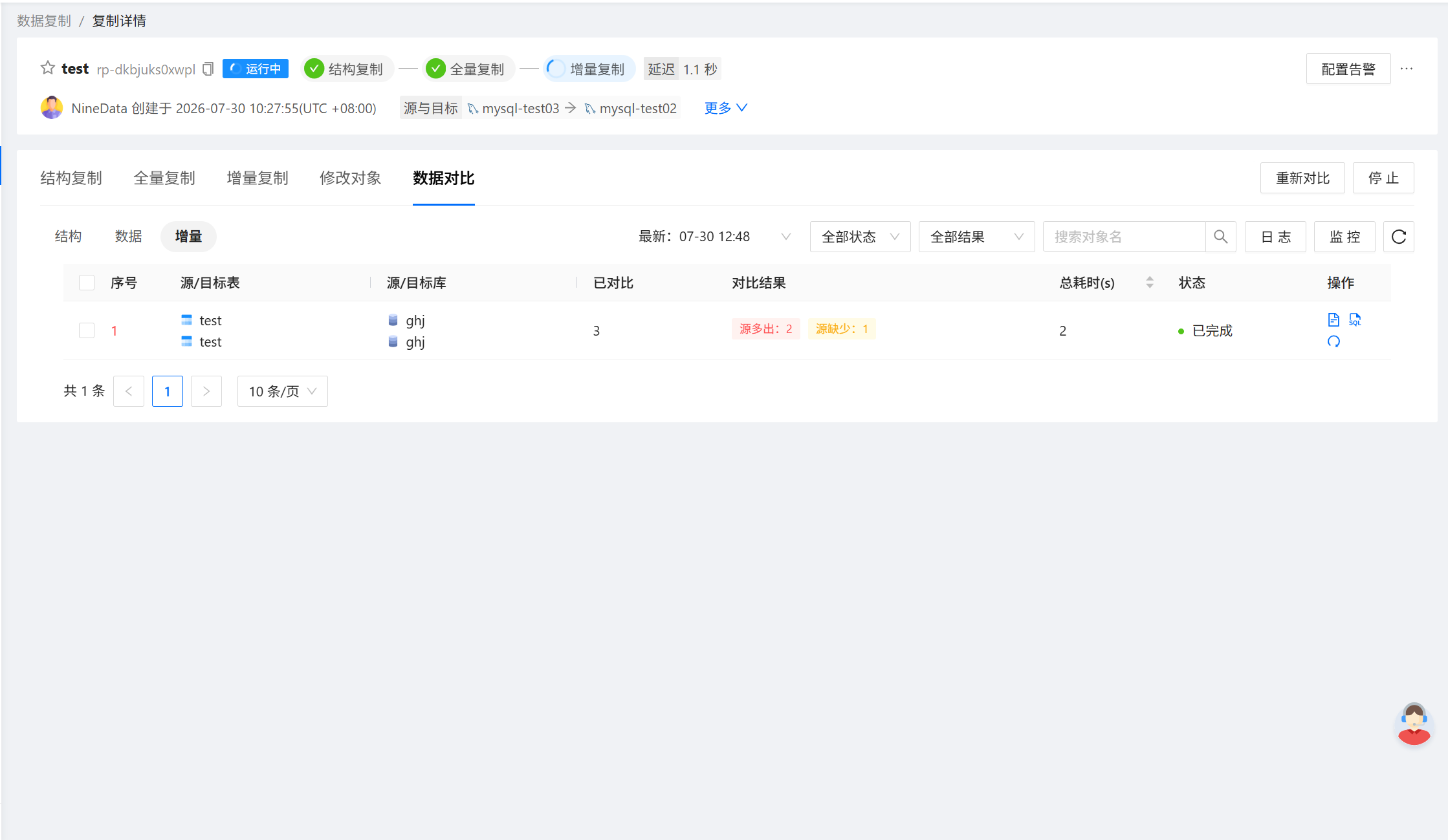
Field Description Source/Target Table The source and target tables included in incremental comparison. Source/Target Database The source and target database names. Compared The number of incremental records compared in the current batch. Results The current comparison result. Total Exec. Time(s) The time used to compare this table in the current batch. Status The current execution status. Actions View difference details or rerun comparison for this table. For inconsistent results, generate remediation SQL. After new changes are replicated, if the page still shows the previous batch, click the table's Re-compare icon and confirm the rerun.
To start another comparison round, click the page-level Re-compare action. Use Log to view execution records and Monitor to view comparison metrics.
View difference details
For an inconsistent result, click the table's Details icon. The details include:
- Whether each difference exists in the source and target tables.
- The primary key, unique key, or index columns used to locate it.
- Source and target field values.
- The total number of difference records on the current page.
Download details as JSON or Excel. Before downloading, confirm whether the file contains sensitive data and follow your organization's data-security requirements.
Generate and run change SQL
In Comparison Details, click Generate Modify SQL.
Review the SQL. The page displays up to 1,000 differences. To obtain every statement, click Download File.
Review each statement and verify its target, match conditions, and execution order.
Run the approved SQL on the target through your organization's change process.
Rerun incremental comparison for the table and confirm that the result is Consistency.
Change SQL modifies target data. For a value mismatch on the same key, NineData might generate both an insert for the correct record and a delete for the incorrect record. Reorder the statements when required by primary-key constraints—for example, delete the incorrect target record before inserting the correct one. Do not run generated statements in bulk without review.