Configure an AWS External Collection Source
AWS external collection sources are used to collect slow logs from AWS managed databases. The current support scope includes AWS RDS MySQL and AWS RDS PostgreSQL. For AWS RDS MySQL, NineData reads slow log files through RDS instance log APIs and does not rely on CloudWatch log export.
Before you begin
- You have created or joined an organization, and this organization has subscribed to either DevOps Pro or DevOps Enterprise. Please ensure that your annual or monthly subscription is still active. For more information, please refer to Manage Organizations.
- Your current account has switched to the target organization. For more information, please refer to Switching to an Organization.
- AWS access credentials are configured in NineData. For details, see Configure cloud vendor access credentials.
- The target AWS RDS data source has been added. Create or bind the instance through the AWS entry.
- You have confirmed the target RDS instance region and DB instance identifier.
- The AWS access credential has permission to view RDS instances, list RDS log files, and read RDS log file content.
- If the target is AWS RDS MySQL, MySQL slow query logging is enabled and slow logs are written to files.
Permission requirements
AWS RDS MySQL slow log collection reads log files through the RDS instance log APIs. The IAM user or role requires at least the following permissions.
| Action | Purpose |
|---|---|
rds:DescribeDBInstances | View the target RDS instance information. |
rds:DescribeDBLogFiles | List log files for the target instance. |
rds:DownloadDBLogFilePortion | Read RDS log file content in portions. |
The AWS managed policy AmazonRDSReadOnlyAccess covers RDS describe permissions but does not include rds:DownloadDBLogFilePortion. If you use the managed read-only policy, add log file read permission separately. If your enterprise policy requires whole-file download permission, also grant rds:DownloadCompleteDBLogFile. When creating a custom IAM policy, scope the resources to the RDS instances whose slow logs you collect whenever possible.
Step 1: Configure AWS RDS MySQL slow logs
If the target is AWS RDS MySQL, confirm the following parameters in the RDS parameter group first.
| Parameter | Recommended Value | Description |
|---|---|---|
slow_query_log | 1 or ON | Enables the MySQL slow query log. |
long_query_time | Example: 1 | Queries whose execution time exceeds this threshold are recorded as slow queries. |
log_output | FILE | Writes slow logs to RDS instance log files. |
After modifying a parameter group, make sure the parameter group has taken effect. For parameters that require a reboot, restart the RDS instance during an approved maintenance window.
Step 2: Create an AWS external collection source
Sign in to the NineData Console.
Go to DevOps > Slow Query.
On the top tab bar, click External Collection Source.
Click Create External Collection Source, then complete the following configuration in the drawer.
Parameter Description Source Type Select AWS. Cloud Access Credential Select the configured AWS access credential. Source Name Enter a custom source name. Description Optional. Enter a description for this source. Click OK to create the source.
Step 3: Bind the source and enable collection
Return to the Slow Query tab, find the target AWS RDS data source, and turn on the switch in the Slow Query column.
In the dialog, select External Source Collection, then complete the following configuration.
Parameter Description External Collection Source Select the AWS external collection source you created. Source Data Source Unique Identifier AWS RDS MySQL usually uses DBInstanceId,RegionId, andLogFilePrefix.Collection Frequency Select the slow log collection frequency. Enter the AWS RDS MySQL identifiers.
Key Description DBInstanceIdThe AWS RDS DB instance identifier. Use the DB instance identifier shown in the AWS console. RegionIdThe AWS region code, for example us-east-1orap-southeast-1. The value must match the region where the instance is located.LogFilePrefixThe slow log file prefix. The default AWS RDS MySQL slow log prefix is usually slowquery/mysql-slowquery.log. Archived slow log files append the date and sequence number to this prefix, so you usually enter only the base prefix.Click OK to enable collection.
Step 4: Confirm collection results
Wait for at least one collection cycle, then open the Slow Query Details page of the target data source. Adjust the time range and check the slow log list, Top SQL, and trend chart to confirm whether slow log records have been written to NineData.
The image below shows AWS RDS MySQL slow logs successfully collected into NineData. In this example, the total slow SQL count is 6, and the SQL template is normalized as SELECT SLEEP(?) AS slept;. Use this page to confirm that slow log records have been written into NineData.
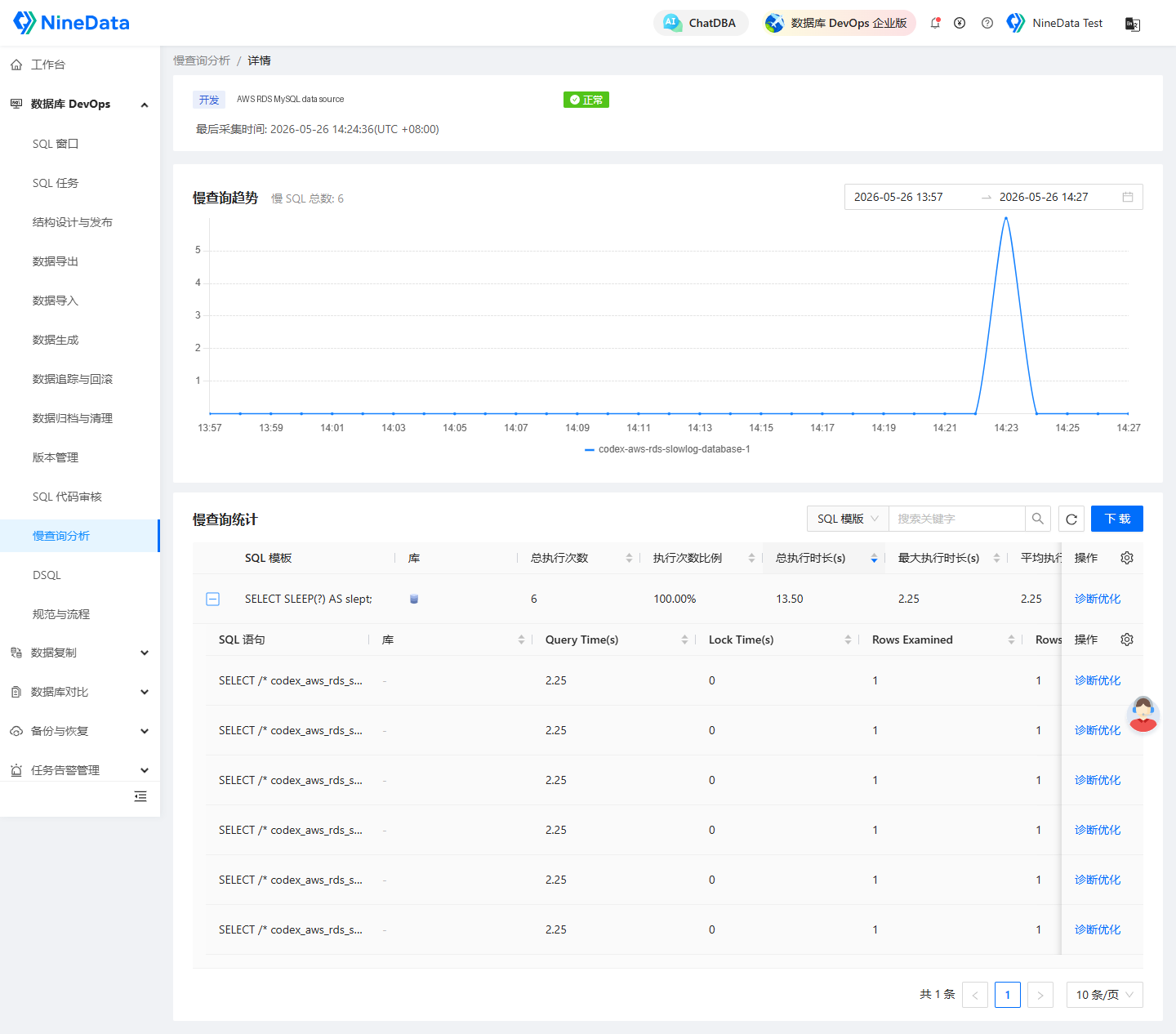
The slow query detail page displays records from a maximum time range of 3 days. If the target instance has no new slow logs, the query result is empty.
Incremental collection notes
AWS RDS MySQL incremental collection records the processed log file and file position. The first collection reads available slow logs based on the configured prefix. Later collections continue from the last successful position. If no new slow logs are available, the collection returns no new records and does not move to an incorrect position. If a collection is interrupted or fails, the retry continues from the last successful position.
FAQ
| Symptom | Recommended Check |
|---|---|
| Cloud access credential not found | Create AWS access credentials in NineData first. |
| Region parameter is missing | Specify RegionId and make sure it matches the target RDS instance. |
| DB instance identifier is missing | Specify DBInstanceId and make sure it matches the DB instance identifier shown in the AWS console. |
| AWS RDS MySQL reports that the slow log file is not found | Make sure slow_query_log is enabled, log_output is set to FILE, and LogFilePrefix matches the actual RDS slow log file prefix. |
| AWS RDS MySQL returns no collected records | Make sure slow query logging is enabled on the instance, slow queries were generated within the selected time range, and LogFilePrefix matches the RDS slow log file prefix. |
| AWS RDS MySQL log file reading fails | Check whether the AWS access credential has permission to read RDS log files, and confirm that RegionId matches DBInstanceId. |
| Data source connection or cloud vendor client connection failed | Check whether the data source was created through the AWS entry. If not, confirm the connection method, region, and instance identifier. If the RDS endpoint cannot be resolved, confirm that the instance is available, the endpoint has not changed, and then resync or edit the data source connection information in NineData. |