Create a Huawei Cloud private network connection
Create a private network connection between NineData and Huawei Cloud so NineData can connect to Huawei Cloud services without exposing the database over a public network.
This operation creates an endpoint in your cloud provider account to connect NineData to cloud provider services in a private network environment. The endpoint service may incur charges. For cost details, see your cloud provider's official billing documentation.
Before you begin
- Your data source is hosted on Huawei Cloud.
- You have purchased a Huawei Cloud cloud server to install the NineData gateway. The cloud server and the VPC of the cloud database are the same, or the cloud server and the cloud database can communicate over the internal network.
Limitations
The current supported region for establishing a private network connection is Huawei Cloud CN East-Shanghai1. Your cloud service must be located in this region.
Procedure
Before creating a private network connection, add the AccessKey information for the target Huawei Cloud account to NineData. For details, see Configure Huawei Cloud Access Credentials.
Sign in to the NineData Console.
Go to Datasource > Private Link.
Hover over Create PrivateLink and select Huawei Cloud from the list.
tipIf no Private Link exists yet, the page is empty. Click Create PrivateLink on the page.On the Create PrivateLink page, configure the parameters.
Parameter Description Name Enter a private network connection name that is easy to identify later. Authorize Select Grant Access Permission and Auto-create. Region Select the region where the data source to be connected via the private network is located. Cloud Vendor Root Account ID Enter the Huawei Cloud main account ID. After entering the ID, select a blank area on the page. Continue after Add Successfully appears.
Note: Only main account IDs are supported. Sub-account IDs are not supported. Contact the main account owner if you need the main account ID.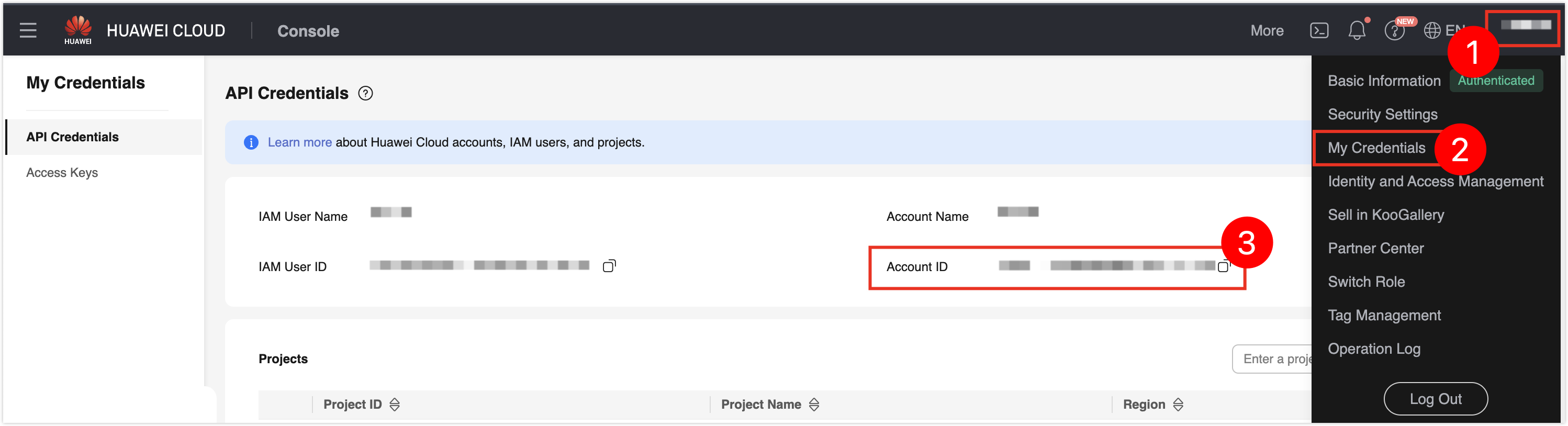
Access Credentials Select the configured cloud vendor access credential. If no credential exists, see Configure Huawei Cloud Access Credentials. VPC Select the VPC used for the endpoint.
Important: The VPC must be the same as the cloud server VPC, or the two VPCs must have private network connectivity.Click Connection Test, wait until Connection Successfully appears, then click Create PrivateLink to navigate to the Install Gateway page.
tipIf the connection test fails, adjust the parameter configurations until the connection test succeeds.
In Environment, select the operating system of your cloud server, and then follow the installation instructions on the page to connect to the target cloud server and install the gateway.
infoThis gateway establishes a connection between the data source and the Huawei Cloud endpoint over the private network. The cloud server used for gateway installation must have private network connectivity with the Huawei Cloud endpoint; otherwise, the gateway connection fails.
After installation finishes, the Install Gateway page shows Gateway Connected. Click Completed and back to List.
Result
The Huawei Cloud private network connection is created in NineData and can be used when you add or manage Huawei Cloud data sources.