Create an Alibaba Cloud PrivateLink Connection
Create a private network connection between NineData and Alibaba Cloud so NineData can connect to Alibaba Cloud services without exposing the database over a public network.
Alibaba Cloud supports two setup modes:
- Automatic creation: NineData uses configured Alibaba Cloud access credentials to create the private network connection.
- Manual creation: You create the Alibaba Cloud endpoint in the Alibaba Cloud console, then enter the endpoint details in NineData.
Before you begin
- The data source is hosted on Alibaba Cloud.
- Alibaba Cloud Endpoint Service is activated for your Alibaba Cloud account. To activate it, open the Alibaba Cloud Endpoint Console and select Active Endpoint Service.
Limitations
Private network connections are supported in these regions: Alibaba Cloud China (Hangzhou), Alibaba Cloud China (Beijing), Alibaba Cloud China (Shenzhen), and Alibaba Cloud Singapore.
Create a Private Network Connection with Authorization
Before using automatic creation, configure an Alibaba Cloud AccessKey or RAM role in NineData. For details, see Configure cloud vendor access credentials.
Sign in to the NineData Console.
Go to Datasource > PrivateLink.
Click Create PrivateLink.
On the Create PrivateLink page, configure the parameters.
Parameter Description Name Enter a private network connection name that is easy to identify later. Cloud Vendor Select Alibaba Cloud. Authorize Select the authorization option that lets NineData create the connection for you. Region Select the region where the data source that requires private network access is located. Cloud Vendor Root Account ID Enter the Alibaba Cloud main account ID. After entering the ID, select a blank area on the page. Continue after Add Successfully appears.
Note: Only the main account ID is supported. Sub-account IDs are not supported. Contact the main account owner if you need the main account ID.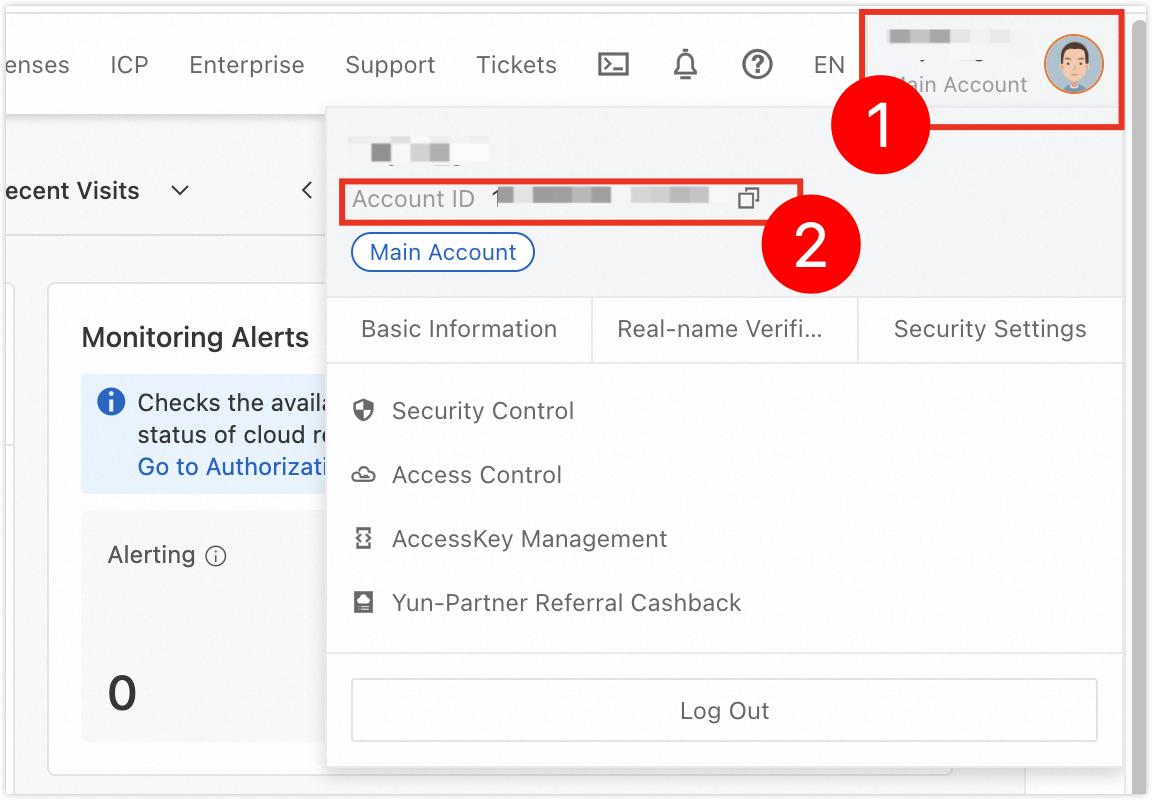
Access Credentials Select the configured cloud vendor access credential. If no credential exists, see Configure cloud vendor access credentials. VPC Select the VPC used for the endpoint.
Important: The VPC must be the same as the ECS VPC, or the two VPCs must have private network connectivity.Click Test Connection and wait for the Connection Succeeded prompt.
Click Create PrivateLink.
tip- If the connection test fails, adjust the parameter configuration and test again.
- If Alibaba Cloud reports
Privatelink-CreateVpcEndpoint: The product is not activated., Alibaba Cloud Endpoint Service is not activated. Open the Alibaba Cloud Endpoint Console and select Active Endpoint Service.
Manually Create a Private Network Connection
Sign in to the NineData Console.
Go to Datasource > PrivateLink.
Click Create PrivateLink.
On the Create PrivateLink page, configure the parameters.
Parameter Description Name Enter a private network connection name that is easy to identify later. Cloud Vendor Select Alibaba Cloud. Authorize Select Without authorization, manually create. Region Select the region where the data source that requires private network access is located. Cloud Vendor Root Account ID Enter the Alibaba Cloud main account ID. After entering the ID, select a blank area on the page. Continue after Add Successfully appears.
Note: Only the main account ID is supported. Sub-account IDs are not supported. Contact the main account owner if you need the main account ID.Endpoint ID Enter the endpoint instance ID created in Alibaba Cloud. To create the endpoint, see Appendix: Create an Alibaba Cloud endpoint. Endpoint IP Enter the endpoint IP address. To obtain it, see Appendix: Create an Alibaba Cloud endpoint. Click Connection Test and wait for the Connection Succeeded prompt.
Click Create PrivateLink.
tipIf the connection test fails, adjust the parameter configuration and test again.
Appendix: Create an Alibaba Cloud Endpoint
Note: Alibaba Cloud does not charge for creating an endpoint.
Sign in to the Alibaba Cloud Endpoint Console.
Select the Reverse Endpoint tab.
Click Create Endpoint.
tipIf Create Endpoint is unavailable, Endpoint Service has not been activated for the account. Select Active Endpoint Service, accept the service agreement, and click Activate PrivateLink.
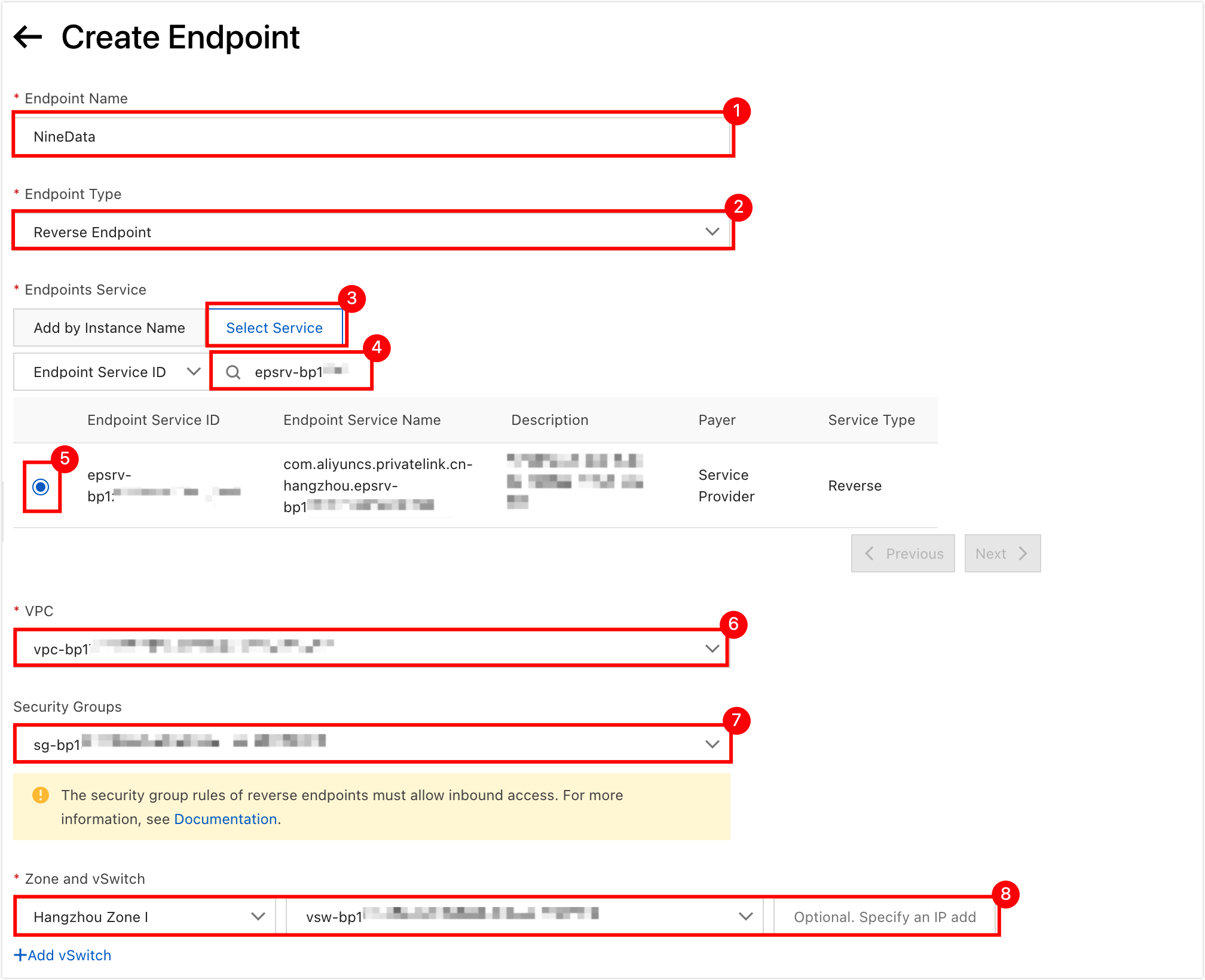
Configure the endpoint parameters.
Parameter Description Endpoint Name Enter an endpoint name. The name must be 2 to 128 characters, start with an English letter, and can contain numbers, underscores (_), and hyphens (-). Endpoint Type Select Reverse Endpoint. Endpoint Service Select the Select Services tab, paste the Connection Endpoint Service ID provided in NineData into the input box, press Enter, and select the filtered service.
Note: If no result appears, confirm that the Connection Endpoint Service ID is correct.VPC Select the VPC used by the ECS where the data source resides. Security Groups Select a security group. If no security group exists, see the Alibaba Cloud documentation. Zones and vSwitches Select the zone and vSwitch of the ECS where the data source is located. Click OK.
After Alibaba Cloud creates the endpoint, record the instance ID and IP Address, then return to continue configuring the private network connection.
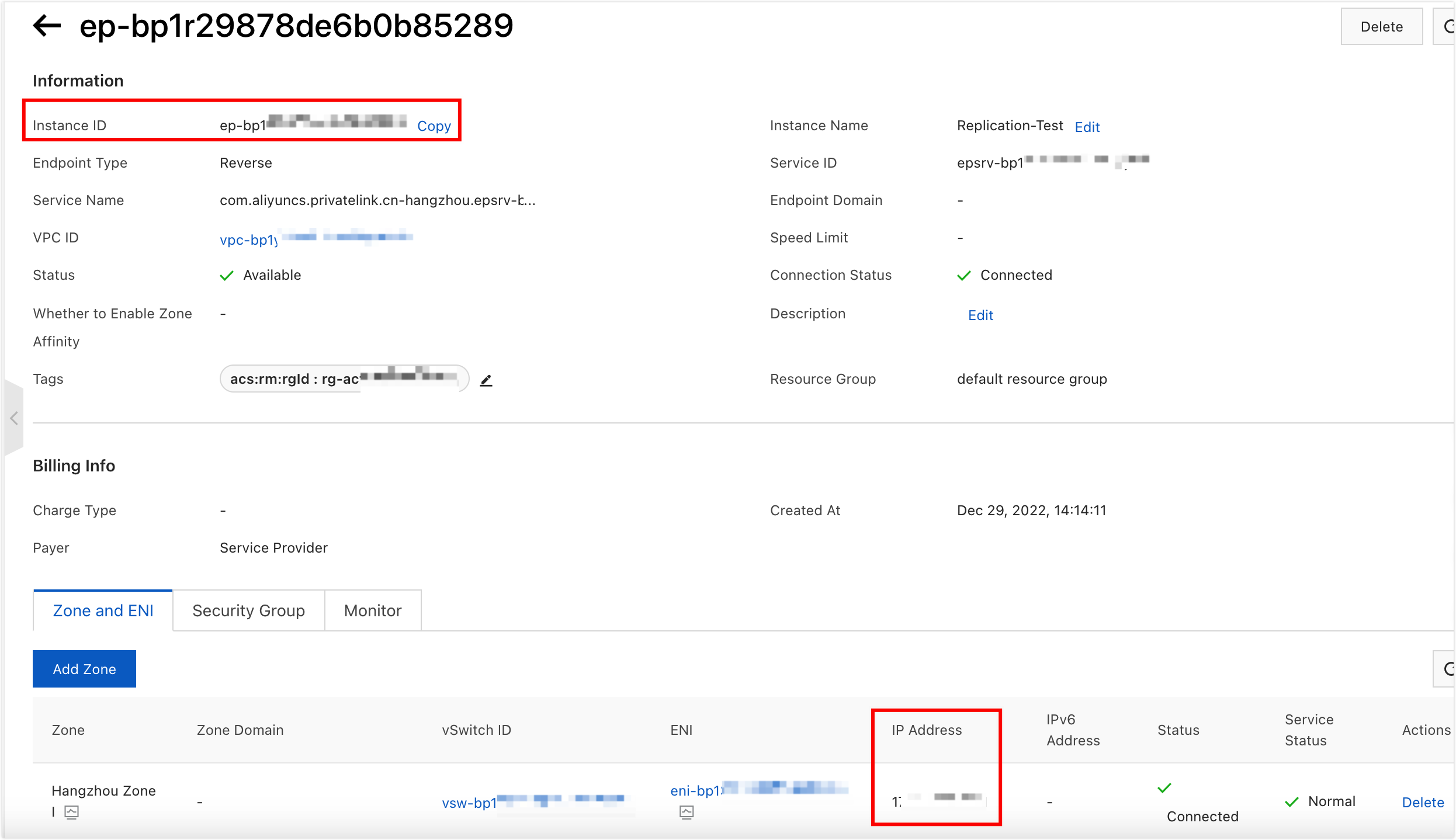
Result
The Alibaba Cloud PrivateLink connection is created in NineData and can be used when you add or manage Alibaba Cloud data sources.