View alert history
NineData creates an alert history record each time an alert is triggered. Use alert history to find affected tasks or gateways, check how alerts were delivered, and review the alert details during troubleshooting.
Before you begin
At least one monitored task or gateway alert must have generated alert history in the current organization.
Procedure
Sign in to the NineData Console.
Open Alert > Alert History.
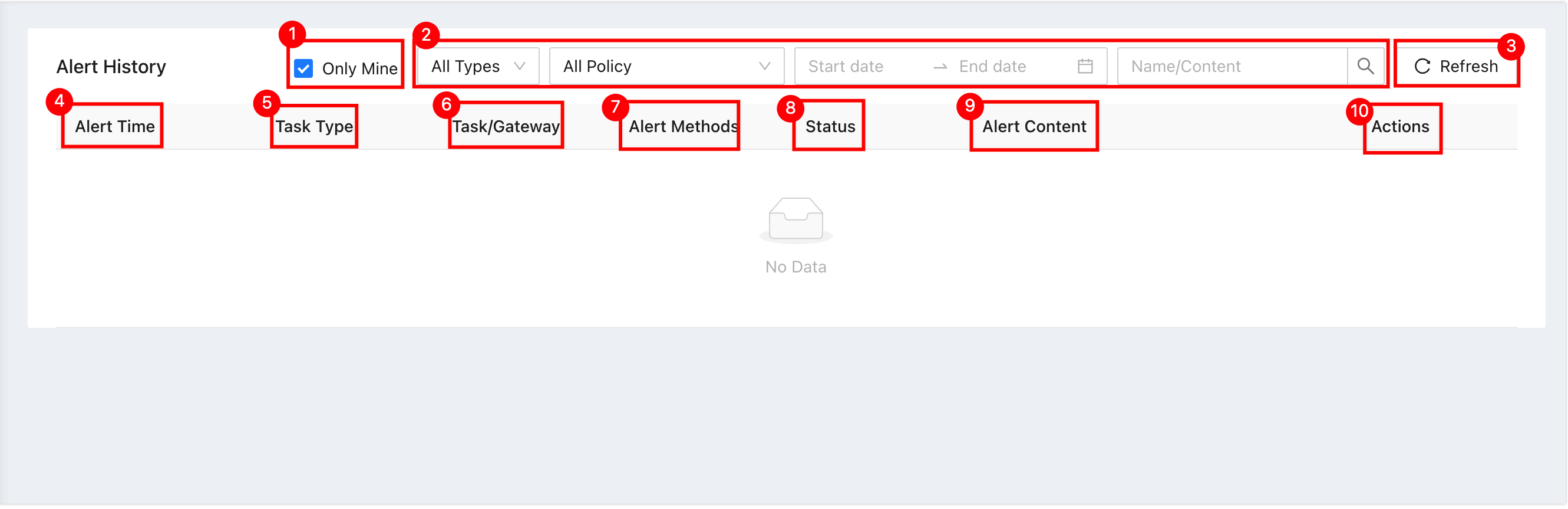
The alert history page includes these areas:
No. Parameter Description 1 Only see my own Filter alert records received by the current account. 2 Content filter options Locate alerts by task type, alert policy, alert time, keyword, and other filters. 3 Refresh Refresh the alert history page. 4 Alert time The time when the alert was sent. 5 Task type The type of task corresponding to the alert. 6 Abnormal task/Gateway The task name or gateway name that triggered the alert. Click the task or gateway name to open the corresponding page. 7 Alert method The notification method used for the alert. 8 Status Whether the alert was delivered successfully. If the target is a group, the status is Success only when all recipients in the group receive the alert. Otherwise, the status is Failed. 9 Alert content Alert details, including the task name and failure reason. 10 Operation Click Details to view the alert details. The details include Basic information, Alert settings, and Alert content.
Result
Review alert records and open a specific alert to check its basic information, alert settings, and alert content.